How to add ads.txt in Blogger
1️⃣ Open your Blogger dashboard
Go to blogger.com and select your blog.
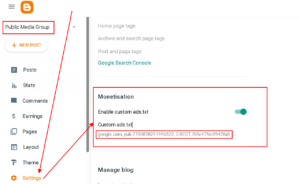
2️⃣ Go to Settings
In the left menu, click Settings.
3️⃣ Find Monetization
Scroll down until you see the Monetization section.
4️⃣ Open ads.txt
-
Click Ads.txt custom content
-
Toggle it ON
5️⃣ Paste your ads.txt code
Paste the code you got from Google AdSense (or any ad network), for example:
👉 If you have multiple ad networks, paste each one on a new line.
6️⃣ Save settings
Click Save (top-right).
7️⃣ Verify (important)
After a few minutes (sometimes up to 24 hours), visit:
If you see your code there → ✅ it’s working.
Common mistakes to avoid 🚫
-
❌ Adding ads.txt in Theme → Edit HTML (not needed)
-
❌ Forgetting to turn ON ads.txt custom content
-
❌ Using the wrong AdSense publisher ID
-
❌ Expecting instant approval (it can take some hours)
If you want, you can:
-
Paste your ads.txt code here and I’ll check it for errors
-
Tell me if this is for AdSense, Ezoic, Mediavine, etc. and I’ll tailor it exactly for that setup